What Is Pinterest for Bloggers: A Beginner’s Guide to Get Started?
Pinterest for bloggers is a strategy for turning a visual search engine into consistent, qualified blog traffic by publishing keyword-optimized pins that link back to your posts.
Pinterest for bloggers: a beginner’s guide to get started is about turning a visual search engine into consistent, qualified blog traffic. If you write posts with evergreen value—recipes, tutorials, travel, finance, wellness—Pinterest can bring readers months after you publish. This guide walks you through setup, strategy, and simple workflows so you can test, measure, and grow without burning out.
You’ll learn how to set up your account for search, create click-worthy pins, and read the numbers that matter. No tricks, just a repeatable approach that fits around your content schedule and compounds over time.
One thing worth understanding right away: Pinterest isn’t Instagram, and it isn’t Twitter. It’s closer to Google than either of those. When someone types “easy meal prep for beginners” into Pinterest’s search bar, they’re not scrolling for entertainment — they want a solution, and they’re ready to click through to find it. That’s a fundamentally different kind of visitor than someone who stumbles across your post in a social feed.
I’m Jamie, and I spent my first few months on Pinterest treating it like a social platform — posting pretty images with vague captions and wondering why nothing was gaining traction. The shift happened when I started thinking about every pin as a search result rather than a social post. Once that clicked, everything else in this guide started making sense. Start there, and you’ll be ahead of most bloggers who give up in month two.
Why Should Bloggers Use Pinterest?
Bloggers should use Pinterest because it functions as a visual search engine where users actively seek ideas and solutions, producing higher-intent clicks and traffic that can last months from a single pin.
Pinterest is a visual search platform, not a traditional social network. People go there with intent: they want ideas, how-tos, and products. That intent translates into higher-quality clicks for most blogs, especially in niches like food, home, DIY, beauty, parenting, wellness, personal finance, and travel.
Unlike Instagram or TikTok, content on Pinterest can reach new audiences for 3–12 months or more. A single strong pin might keep sending 10–100 visits a week long after you forget about it. That “slow-burn” traffic is helpful when your publishing cadence is limited or seasonal. According to Pinterest’s official business resources, the platform has hundreds of millions of active users searching with clear purchase and discovery intent.
Here’s something most beginner bloggers don’t realize: a pin you publish today can still be driving traffic to your blog a year from now. That’s almost unheard of on platforms like Instagram or TikTok, where content has a lifespan measured in hours. Pinterest’s search-driven model means your older content keeps getting discovered as long as it’s keyword-aligned and the post it links to still delivers value.
Pinterest is also massively underused by bloggers in 2026 — most people abandon it after a few weeks because they treat it like a social network and never give their pins enough time to compound. If your blog covers evergreen topics, you’re leaving a real, durable traffic source on the table every day you’re not actively building there.
How Do You Set Up Your Pinterest Business Account the Right Way?
Set up your Pinterest Business account by switching to a free Business profile, claiming your website, enabling Rich Pins, and building keyword-optimized boards that match your blog’s core topics.
Your setup shapes discoverability. A clean profile and relevant boards give your pins context and help the algorithm understand where to show them.
- Switch to a Business account: It’s free and access analytics and Rich Pins. Claim your website for verified ownership.
- Use consistent branding: Upload a clear logo or headshot. Match your display name and bio to your blog niche with natural keywords.
- Write a concise bio: Include 1–2 primary topics, who you help, and an outcome. Example: “Quick, budget-friendly recipes for busy families. Weekly meal plans and 30-min dinners.”
- Create 8–12 core boards: Each board should match a primary topic on your site. Fill board descriptions with natural phrases readers would search.
- Enable Rich Pins: They pull metadata like titles and descriptions automatically, improving context and CTR.
Example Board Setup
- Main board: “Your Blog Name | Best [Niche] Guides”
- Topic boards: “Easy Weeknight Dinners,” “Meal Prep,” “Vegetarian Recipes,” “Instant Pot Basics,” “Lunchbox Ideas”
- Seasonal boards: “Fall Comfort Food,” “Healthy January Reset”
One practical tip you can act on today: when you write your board descriptions, write them the way your reader would type a search query — not the way a marketer would write a tagline. A board called “Healthy Living Tips” tells Pinterest’s algorithm almost nothing. A board described as “quick healthy lunches for work, easy meal prep ideas, and high-protein snacks for busy people” gives the algorithm real signals to work with and helps your pins surface in relevant searches.
Also, don’t skip the step of enabling Rich Pins — it’s free and takes about 10 minutes to set up through Pinterest’s developer tools. Rich Pins automatically pull your post’s title and meta description directly from your site, which means your pins stay updated if you edit your content and they look more polished in search results without any extra design work on your end.
How Do You Do Keyword Research for Pinterest (Fast and Simple)?
Do Pinterest keyword research by using the platform’s search bar auto-complete, related filter tiles, and top pin phrasing to identify the exact terms your target readers are already searching.
On Pinterest, keywords are about matching intent. You don’t need long tools to start—use in-platform signals and a quick system.
- Search bar suggestions: Type your topic and note auto-complete suggestions (“budget travel europe,” “one pan chicken,” “capsule wardrobe work”).
- Related tiles: After searching, look for the colored filter chips and related searches—these are real user queries.
- Pin titles from top results: Note common phrasing. Don’t copy; adapt. If many top pins say “30-minute,” time-based modifiers matter to your audience.
- Google alignment: If your blog post targets “how to clean white sneakers,” use the exact phrase in your pin title and description. Cross-channel consistency helps.
Where to Place Keywords
- Profile bio: 1–2 niche keywords.
- Board titles and descriptions: Be clear and specific.
- Pin titles and descriptions: Natural language including benefit, timeframe, or outcome.
- Overlay text: Reinforce the main keyword and value prop.
Before you write a single post, open Pinterest search and type your topic — if the autocomplete suggestions are thin or vague, that niche may struggle to get traction there, and you’ll want to factor that into your content strategy from day one. This takes about five minutes and can save you weeks of effort pointing pins at content that Pinterest’s audience simply isn’t searching for.
Pinterest’s Trends tool (available free inside your Business account) is also worth bookmarking. It shows you which search terms are gaining momentum week over week, which is especially useful for planning seasonal content. If you can see that “summer capsule wardrobe” starts trending in late April, you know to have those pins live by mid-March so they have time to index before the peak hits.
How Do You Create Pinterest Pins That Get Clicks?
Create Pinterest pins that get clicks by using a vertical 2:3 format, a bold 6–10 word benefit-driven headline, high-contrast typography, and imagery that accurately reflects the post’s outcome.
Great pins do two things: grab attention and promise a clear outcome. Keep them simple. Over-designed pins can reduce clarity and CTR.
- Vertical format: 1000×1500 pixels (2:3 ratio) is standard. Keep your brand fonts legible on mobile.
- Strong overlay text: 6–10 words max. Lead with the benefit: “14 Budget Dinners Under $5,” “Carry-On Only Packing List,” “Beginner Strength Plan PDF.”
- Readable typography: High-contrast colors and large fonts. Test sans-serif for body and a bold display font for headlines.
- Relevant imagery: Use photos that match the result (finished dish, capsule outfits, before/after). Avoid misleading images.
- Subtle branding: Small logo or URL in the corner. Enough to build recognition without clutter.
Pin Title Formulas That Work
- How to + Outcome + Time/Constraint: “How to Start a Capsule Wardrobe in 7 Days”
- Number + Topic + Qualifier: “21 Easy Mediterranean Dinners (30 Minutes)”
- Checklist/Guide: “Hand Luggage Only: Complete Packing List”
Realistic Performance Benchmarks
- Fresh accounts: 1–3 months to see stability. Early CTRs may sit around 0.5–1.5% on standard pins while impressions grow.
- Established accounts: It’s common to see pins with 20k–200k impressions over a few months. CTRs of 1–3% are decent; 3–5% is strong for content that solves a clear problem.
- Idea Pins vs. outbound clicks: Idea Pins can boost reach and follower growth, but standard pins generally drive more site clicks. Mix both based on goals.
If you’re designing pins in Canva, build yourself three to five reusable templates in your brand fonts and colors — then only swap out the headline text and background image for each new pin. This keeps your visual identity consistent across your boards (which helps readers recognize your content in a crowded feed) and cuts your design time down to a few minutes per pin once the templates are set up.
One thing I’ve noticed after testing dozens of pin styles: lifestyle images with a person in context almost always outperform flat-lay or graphic-only designs in niches like food, wellness, and home decor. If you’re in a more text-heavy niche like personal finance or blogging tips, a clean graphic with a bold, specific headline tends to perform better than stock photography. Test both early and let your own analytics tell you which direction to lean.
What Does a Simple, Sustainable Pinning Schedule Look Like?
A sustainable pinning schedule for beginner bloggers starts at 3–5 fresh pins per week, prioritizing new creatives over recycled designs and timing seasonal content 6–8 weeks in advance.
Consistency beats volume. Many bloggers burn out trying to post 10 pins a day. Start lean, measure, and scale what works.
- Beginner cadence: 3–5 fresh pins per week tied to recent or evergreen posts.
- Fresh > re-pins: “Fresh” means a new image/creative, even to an existing URL. Prioritize new creatives over recycling the same look.
- Board relevance first: Pin to your most relevant board. Optional: add to one secondary board if it’s a genuine match.
- Seasonality: Start seasonal content 6–8 weeks ahead. For example, publish “Holiday Cookie Box” pins in October.
Workflow Example
- Week 1: Publish a blog post. Create 2 pin designs with different headlines and colors.
- Week 2: Create 1 Idea Pin summarizing a tip or step-by-step, and 1 more static pin with a new image crop.
- Week 3: Refresh the strongest headline variant with a new background image.
In testing, small creative changes—like swapping a dark overlay for a light one—can shift CTR by 0.3–0.8 percentage points. Track these micro-wins.
If you want to take the manual work out of scheduling, Pinterest’s native scheduler (built directly into the platform) lets you queue pins up to two weeks in advance for free — no third-party tool required to get started. I tracked my results across both manual and scheduled pinning for several months and found that consistency mattered far more than volume. Posting five well-optimized pins on a reliable weekly schedule consistently outperformed bursts of 20 pins followed by two weeks of silence.
Tailwind is worth mentioning as a paid upgrade once you’re ready to scale — it lets you schedule further in advance and gives you interval-based scheduling so your pins don’t all go out at the same time. But honestly, start with Pinterest’s native scheduler and only add a paid tool when you have enough content that managing it manually becomes genuinely time-consuming.
How Do You Optimize Landing Pages for Pinterest Traffic?
Optimize landing pages for Pinterest traffic by matching the pin’s headline promise above the fold, loading the page in under 2.5 seconds on mobile, and using scannable structure with clear internal links.
Pinners often skim. If your landing page loads slowly or buries the payoff, they bounce. Focus on clarity and speed.
- Match the promise: First screen should confirm the pin’s headline and deliver the key takeaway quickly.
- Fast load: Aim for sub-2.5s on mobile. Compress images and defer heavy scripts.
- Readable structure: Short paragraphs, scannable subheads, a jump-to list for longer tutorials.
- Opt-ins and internal links: Offer a relevant lead magnet (checklist, template) and 2–3 contextual internal links to keep readers engaged. If you’re new to driving blog traffic, pairing Pinterest with basic on-page SEO compounds results faster.
Example Alignment
- Pin: “7-Day Beginner Strength Plan (No Gym)”
- Landing: Headline repeats promise; day-by-day routine above the fold; printable PDF opt-in; link to form tutorial and equipment guide.
One practical thing you can do right now: open your most-pinned blog post on your phone and read the first screen without scrolling. Does it immediately confirm what the pin promised? If a reader clicked a pin titled “10 Budget Meals Under $5” and your post opens with three paragraphs about your personal cooking journey before getting to the recipes, you’re losing people in the first 10 seconds. Pinterest traffic is impatient — deliver the payoff fast.
Internal linking is also worth building deliberately into your landing pages. When a Pinterest visitor lands on your post, they’re often in a browsing mindset — they clicked because they were curious, and if your content delivers, they’re open to reading more. A contextual link to a related post (not just a generic “you might also like” widget) gives them a natural next step and keeps them on your site longer, which signals to Google that your content is worth ranking too.
Which Pinterest Metrics Should Bloggers Track?
Bloggers should track outbound clicks, saves, impressions, and click-through rate (CTR) on Pinterest — with outbound clicks being the most direct indicator of blog traffic growth.
Vanity impressions feel good but won’t grow your blog alone. Track a tight set of metrics that reflect search reach and reader value.
- Impressions: Gauge discoverability. A rising trend indicates better keyword alignment and engagement signals.
- Outbound clicks: Your core metric for blog traffic. Pair with Google Analytics to see session duration and conversions.
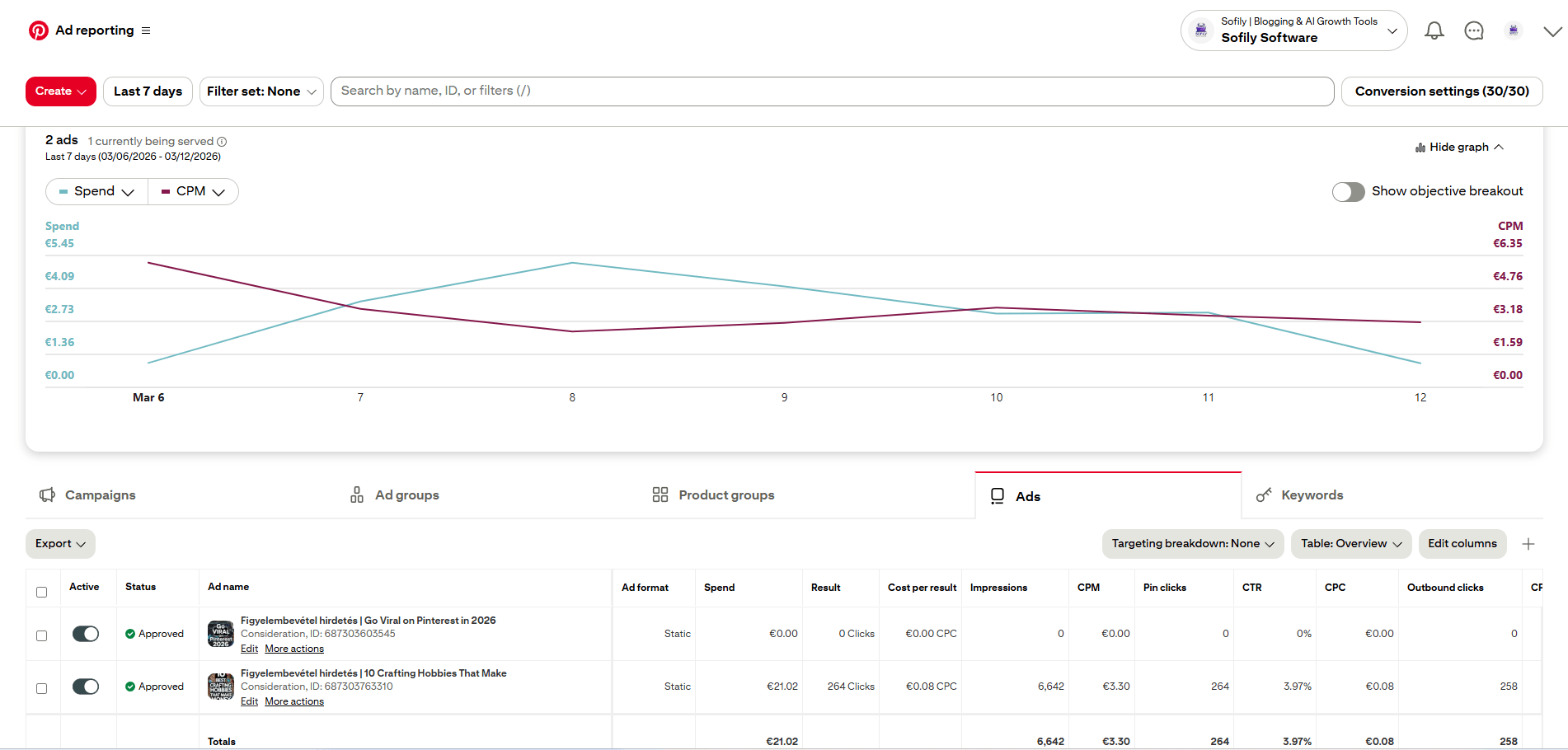
- CTR: Clicks divided by impressions. If impressions rise but CTR falls, your creative or promise needs work.
- Saves: A forward-looking signal. Saves today can mean clicks later as saved pins resurface.
Benchmarks and Adjustments
- If your monthly impressions increase 50% but clicks are flat, test 2–3 new headline angles on your top URLs.
- If saves are healthy but CTR is under 1%, the content may be inspirational but not actionable. Add numbers, time frames, or outcomes to the overlay text.
- When a pin crosses 10k impressions with CTR 3–5%, produce two fresh variants targeting adjacent keywords.
A realistic SEO observation: Pinterest traffic can be lumpy. You might see a pin goose traffic for 2–3 weeks and then plateau. That’s normal. Think portfolio, not single-pin heroics.
One metric that often gets overlooked is your save rate — the ratio of saves to impressions on a given pin. A high save rate tells you that people found the content valuable enough to bookmark for later, which is a strong signal that your pin is resonating with the right audience. Pinterest’s algorithm also uses saves as a quality signal, so pins with strong save rates tend to get distributed more broadly over time.
Connect your Pinterest Business account to Google Analytics (GA4) so you can see exactly which pins are sending traffic and what those visitors do once they arrive. Pinterest Analytics tells you what’s happening on the platform; Google Analytics tells you what happens after the click. You need both views to make smart decisions about which content to create more of.
What Are the Most Common Mistakes New Bloggers Make on Pinterest?
The most common Pinterest mistakes new bloggers make include creating over-broad boards, using text-heavy pin designs, pinning irrelevant content, and ignoring analytics that reveal easy wins.
Most early struggles come from unclear targeting or skipping the basics. Avoid these, and you’ll compound faster.
- Over-broad boards: “Lifestyle” tells the algorithm nothing. Niche down: “Minimalist Bedroom Ideas,” “Tiny Kitchen Storage.”
- Text-heavy pins: If your headline requires zooming, it’s too long or too small. Aim for quick readability.
- Irrelevant repinning: Pinning content you don’t cover confuses your topical authority.
- Inconsistent URLs: Don’t send multiple distinct pin promises to the same vague landing page.
- Neglecting analytics: If you never compare CTR by headline style, you leave easy wins on the table.
Another honest note: Some niches just run colder. B2B SaaS, deep technical posts, or hyper-local topics may see lower CTRs. You can still benefit—just align expectations and lean into Idea Pins for brand discovery.
Another mistake I see constantly: bloggers pinning content from other accounts to fill their boards without adding enough of their own. Repinning other people’s content isn’t inherently bad, but if your boards are mostly other people’s pins, you’re building their traffic, not yours. Aim to have your own content make up a meaningful portion of each board — especially your most keyword-targeted boards.
A DIY and home decor blogger I know started with 40 unfocused boards covering everything from recipes to travel quotes. She restructured down to 12 tightly themed boards with keyword-rich descriptions, and her existing pins started getting redistributed by Pinterest’s algorithm without her creating any new content. The lesson: a focused, well-organized profile works harder for you than a sprawling one.
Which Tools and Templates Speed Up Pinterest for Bloggers?
The most useful tools for Pinterest bloggers are Canva for pin design, Pinterest’s native scheduler for publishing, and Pinterest Analytics paired with Google Analytics for performance tracking.
You don’t need complex stacks to get results. A few simple tools and a checklist keep you on track.
Design Tools
- Canva: Build 3–5 reusable templates in your brand fonts. Lock key elements; only swap images and headlines. See our guide to Canva pin templates for a step-by-step walkthrough.
- Figma: For teams that want stricter design systems and version control.
Scheduling and Tracking
- Pinterest Scheduler: Native scheduling for free. Good enough to start.
- Tailwind: Useful for batching, though not mandatory. Use sparingly; prioritize fresh creatives over heavy automation.
Analytics and Research
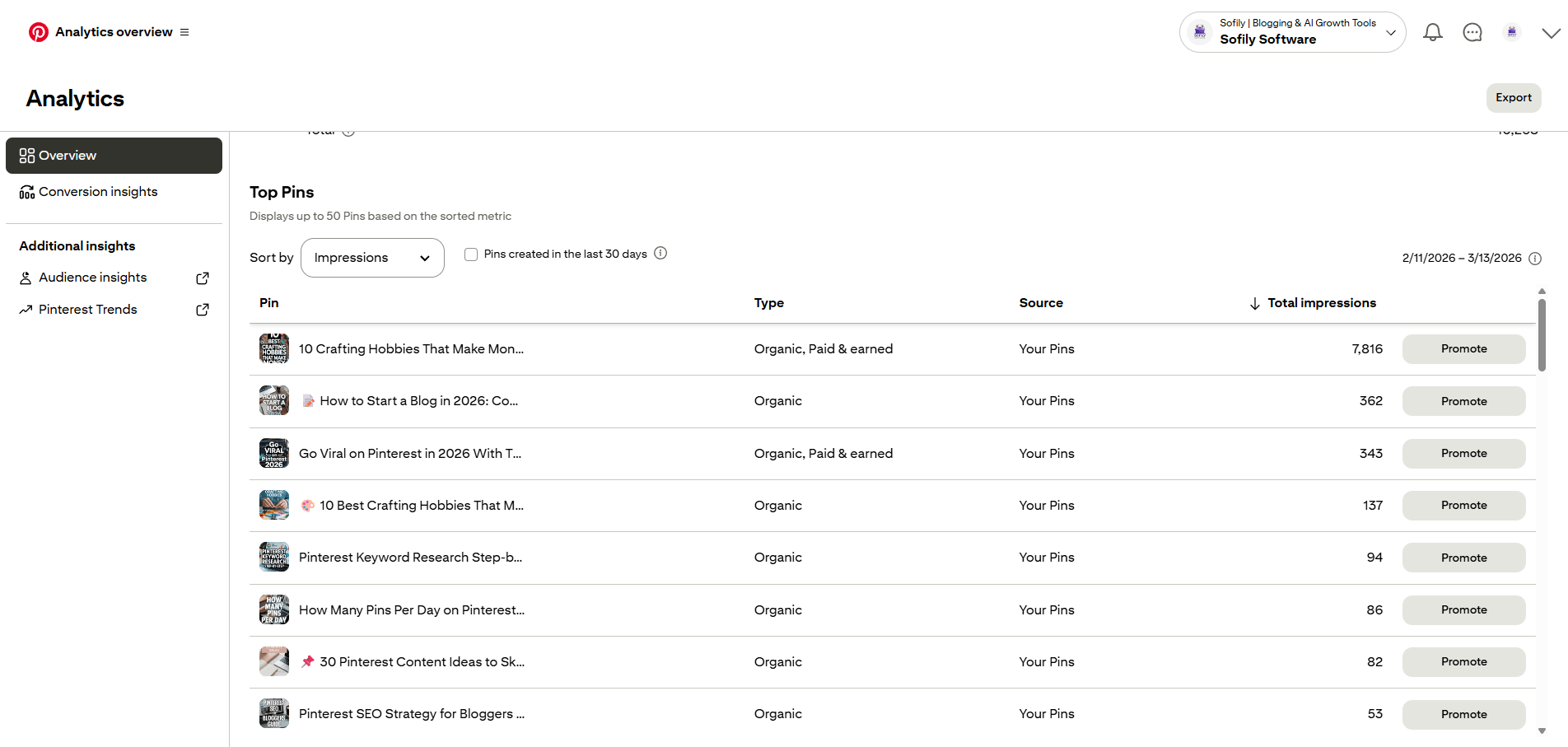
- Pinterest Analytics: Track top pins by outbound clicks and saves.
- Google Analytics: Create a segment for Pinterest to monitor session duration, conversion rate, and top landing pages.
- Google Search Console: Cross-check if posts gaining on Pinterest also trend in search—often a sign your topic resonates broadly.
Pin Creation Checklist
- Clear keyword in title and overlay
- Action-oriented benefit in 6–10 words
- High-contrast font and legible size
- Branded corner with logo or URL
- Mobile crop safe (view at 50% size to test legibility)
One tool that doesn’t get mentioned enough for Pinterest bloggers is Google Analytics (GA4) paired with UTM parameters. When you create a pin, add a UTM tag to your URL so you can track in GA4 exactly which pins are sending traffic, not just that Pinterest is sending traffic in general. It takes an extra 30 seconds per pin and gives you data that makes your testing framework actually actionable.
How Do You Turn Pinterest Clicks Into Loyal Blog Readers?
Turn Pinterest clicks into loyal readers by pairing each pin with a relevant lead magnet, strong internal links, and a short email welcome sequence that surfaces your best content.

Traffic is a milestone, not the finish line. Convert Pinterest visitors into subscribers or repeat readers.
- Lead magnets: Offer a relevant freebie tied to the pin’s promise—checklists, templates, quick-start plans.
- Content upgrades: A printable version of the blog post or a bonus step-by-step can improve opt-in rates.
- Smart internal links: Use descriptive anchor text to move readers to related posts. Add a “Start Here” or “Popular Guides.”
- Email sequences: A 3–5 email welcome series that select your best content cements loyalty.
Realistic Outcomes
- Month 1–2: Modest impressions; 50–300 outbound clicks total.
- Month 3–4: A few pins begin compounding; 500–2,000 monthly clicks if you’re posting weekly and testing creatives.
- Month 6+: Seasonal lifts; consistent 1–3k monthly visits possible in active niches with 3–5 fresh pins per week.
We’ve seen opt-in rates from Pinterest traffic range 1–5% on well-matched landing pages, with higher rates on checklists and templates that solve an immediate need.
One of the quietest earners you can set up early is a dedicated resources or tools page on your blog. Link to it from your most-visited Pinterest landing pages, and fill it with affiliate products or tools that are genuinely relevant to your niche. It becomes an evergreen page that works even when you’re not actively promoting anything — and Pinterest traffic, which tends to skew toward action-oriented readers, converts on these pages surprisingly well.
Email is still the most reliable way to turn a one-time Pinterest visitor into a repeat reader. A simple two- or three-email welcome sequence that surfaces your best content — not just a single “thanks for subscribing” message — gives new subscribers a reason to come back before they forget they signed up. Tools like Mailchimp have free plans that are more than enough to get this set up before you hit a few hundred subscribers.
How Do You Run a Pinterest Testing Framework With Clear Signals?
Run a Pinterest testing framework by isolating one variable at a time — headline, color contrast, or image style — and waiting for 5,000–10,000 impressions before drawing conclusions about CTR.

Testing on Pinterest works best when you isolate variables. Avoid changing everything at once.
- Headline variants: Test number-led vs. benefit-led headlines. Keep imagery constant.
- Color contrast: Dark overlay vs. light overlay. Same headline and image.
- Image style: Close-up vs. lifestyle context. Keep headline and colors identical.
How to Read Results
- Let a test run to 5,000–10,000 impressions where possible before judging CTR.
- If two variants are within 0.2 percentage points CTR, treat them equal and pick the one that’s faster to produce.
- Scale winners by creating 1–2 fresh designs that keep the winning element and shift one minor variable.
A common mistake is chasing viral outliers. Instead, build a base of steady performers. Ten pins delivering 10–20 clicks per week each is healthier than one spike you can’t reproduce.
A simple way to track your tests without overcomplicating things: keep a plain spreadsheet with columns for pin URL, variable being tested, publish date, impressions at 30 days, and outbound clicks. It doesn’t need to be fancy — the goal is just to have a record you can actually look back at. Without that, you end up making decisions based on gut feeling rather than what your own data is telling you.
What Are Pinterest for Bloggers: A Beginner’s Guide to Get Started — Action Plan?
Follow this 30-day action plan to launch Pinterest for your blog without overhauling your routine: set up your Business account in week one, publish fresh pins in weeks two and three, and review analytics in week four.

To make this practical, here’s a 30-day launch plan you can follow without overhauling your routine.
- Week 1: Convert to Business, claim domain, enable Rich Pins. Create 10 boards with keyworded descriptions. Design 3 pin templates.
- Week 2: Publish 2 fresh pins for your latest post and 2 for evergreen posts. Write titles and descriptions using keyword phrases and a clear benefit.
- Week 3: Create 1 Idea Pin summarizing a tutorial. Launch 2 more fresh pins to your highest-performing URLs.
- Week 4: Review analytics. Identify the top 2 pins by CTR and produce 2 design variants. Optimize the landing pages for speed and clarity.
By day 30, you should have 8–12 fresh pins, early data on what headlines resonate, and a repeatable workflow you can maintain in under two hours per week.
One addition worth building into your week-four review: look at which of your pins earned the most saves, not just the most clicks. High-save pins are telling you something important — that content resonated enough for people to bookmark it. Those topics are worth creating more of in month two, because Pinterest’s algorithm tends to keep distributing pins that accumulate saves over time.
Conclusion: Pinterest for Bloggers: A Beginner’s Guide to Get Started
Pinterest for bloggers comes down to a few consistent habits: clear keywords, simple pin designs, relevant boards, and steady testing that compounds into predictable traffic over time.
Pinterest for Bloggers: A Beginner’s Guide to Get Started comes down to a few consistent habits: clear keywords, simple pin designs, relevant boards, and steady testing. Treat Pinterest as a visual search engine, align your pins with real user intent, and deliver on the promise the moment someone lands on your post.
Aim for sustainable output—3–5 fresh pins per week—and track CTR, saves, and outbound clicks alongside on-site engagement. With that foundation, you can build predictable, compounding traffic without chasing trends or burning out.
The bloggers who get the most out of Pinterest aren’t the ones who post the most pins — they’re the ones who stay consistent long enough for their content to compound. A library of 30 solid, problem-solving posts with well-optimized pins will outperform one viral hit every single time for building traffic that’s actually predictable. Give it 90 days of consistent effort before you judge whether it’s working.
Frequently Asked Questions
Is Pinterest still worth it for bloggers in 2024 and beyond?
Yes — and it’s actually underused by most bloggers right now. Because Pinterest functions as a search engine rather than a social feed, the content you publish today can keep driving traffic for months or even years. Bloggers in evergreen niches like food, wellness, personal finance, home decor, and DIY tend to see the strongest long-term returns from a consistent Pinterest strategy.
How long does it take to see real traffic from Pinterest?
Most bloggers start seeing meaningful outbound clicks within 60 to 90 days of consistent pinning — but “consistent” is the key word. Sporadic bursts of activity followed by silence rarely produce compounding results. Stick to a steady schedule of 3–5 fresh pins per week and give your pins at least 30 days to index before drawing conclusions about performance.
Do I need a paid tool to manage Pinterest, or can I start for free?
You can absolutely start for free. Pinterest’s native scheduler lets you queue pins up to two weeks in advance at no cost, and Pinterest Analytics gives you the core metrics you need to track progress. Paid tools like Tailwind are worth considering once you’re publishing enough content that manual scheduling becomes genuinely time-consuming — but they’re not necessary at the beginning.
What types of blog content perform best on Pinterest?
Evergreen, solution-focused content consistently outperforms trend-chasing posts on Pinterest. Think tutorials, how-to guides, recipe roundups, budget breakdowns, beginner guides, and seasonal planning content. Posts that answer a specific question or solve a clear problem tend to earn more saves and clicks than broad, general-interest content.
How do I know if my Pinterest strategy is actually working?
Track outbound clicks (the number of people clicking through to your blog) as your primary metric — not impressions alone. Connect your Pinterest Business account to Google Analytics using UTM parameters so you can see exactly which pins are sending traffic and what those visitors do once they arrive. Review your data every 30 days and use it to guide what you create next, rather than guessing.